

- Severity: CVSS 8.8 (High) · Google rates this Critical
- Affected: Android 14, 15, 16, 16-qpr2 (all prior to 2026-05-01 patch level)
- Patched: 2026-05-01 · Exploitation: PoC public; no confirmed in-the-wild exploitation
Introduction
CVE-2026-0073 was disclosed in Google’s May 2026 Android Security Bulletin, published May 4, 2026. The vulnerability lives in adbd, the Android Debug Bridge daemon, specifically inside the adbd_tls_verify_cert function in auth.cpp. This function is responsible for verifying the TLS client certificate presented by a connecting host during wireless ADB authentication, a feature introduced in Android 11.
The root cause is classified as CWE-303: Incorrect Implementation of Authentication Algorithm. The bug is a logic error in the certificate comparison path, not a memory safety issue or injection flaw. Exploitation requires only that the attacker be on the same local network or within physical wireless proximity of the target device, and that wireless debugging (or ADB-over-TCP) is reachable. No credentials, pairings, or user interaction on the device are needed.
Critically, this does not affect:
- Devices with wireless debugging and ADB-over-TCP entirely disabled
- USB-only ADB configurations (the vulnerable path is specific to the wireless/TCP transport)
- Android 13 and earlier (advisory lists only Android 14, 15, 16, 16-qpr2)
- iOS, desktop OSes, or any non-Android platform
Because adbd is part of Project Mainline, Google can deliver the fix directly via Google Play system updates, bypassing carrier and OEM release cycles entirely.
What Happened
The wireless ADB pairing model is built on mutual TLS: both the device and the connecting host exchange certificates, and adbd is supposed to check that the host’s certificate corresponds to a previously trusted and paired host key stored in /data/misc/adb/adb_keys. The adbd_tls_verify_cert function performs this check by comparing the public key in the presented TLS certificate against the known trusted keys.
The logic error emerges in cross-algorithm key comparisons. When both keys are the same type (e.g., RSA vs RSA), a mismatch correctly returns 0 and the connection is rejected. But when an attacker presents a certificate carrying a key of a different algorithm type, for example, an EC P-256 or Ed25519 key, the comparison API returns a non-zero value to signal “different key type.” The flawed code in adbd_tls_verify_cert misinterprets that non-zero return as a successful match, promoting an untrusted cross-algorithm certificate into a fully authorised ADB host identity. The rest of the ADB stack then behaves as if the peer is legitimate, allowing the attacker to open a remote shell as Android’s shell user.
This is not command injection in the traditional sense. It is a trust failure: the attacker does not inject code into a vulnerable buffer, they bypass the gate that decides whether a peer is trusted at all. Once past that gate, ADB’s own shell service does the rest.
Exploit maturity: a public PoC has been published on GitHub (SecTestAnnaQuinn/CVE-2026-0073-Android-adbd-authentication-bypass-POC), confirmed working on Android 14. No confirmed in-the-wild exploitation has been reported as of the date of this post.
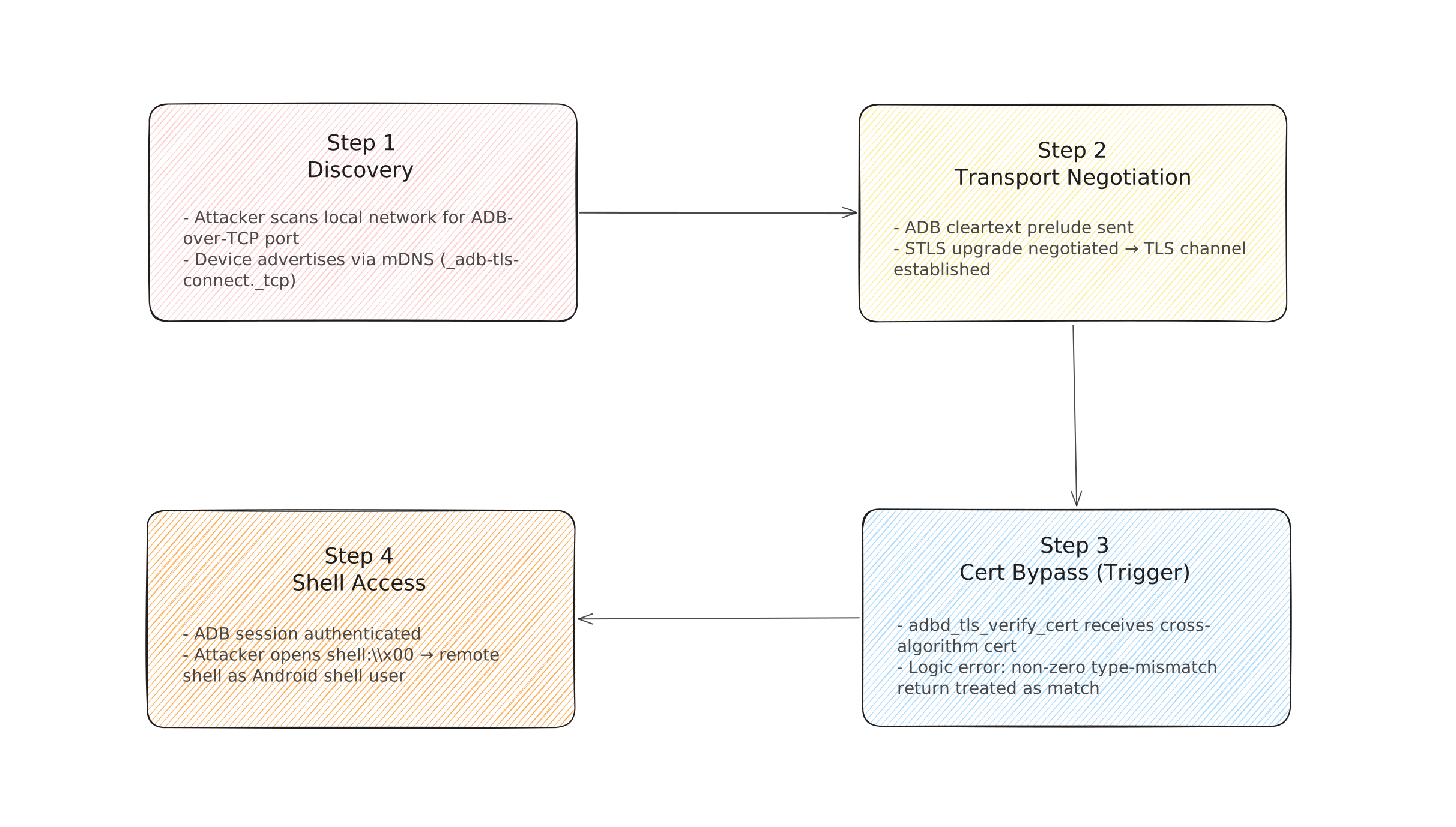
Fig 1: Exploit Chain Overview
Attack Sequence
An attacker begins by scanning the local network for open ADB-over-TCP ports. When wireless debugging is enabled, adbd listens on a randomly assigned TCP port and advertises availability via mDNS, making discovery straightforward on a shared network.
Once the port is located, the attacker initiates an ADB transport connection and speaks the ADB cleartext prelude, including negotiation of the STLS (Start TLS) upgrade. This transitions the connection to TLS, at which point the attacker presents a crafted TLS client certificate carrying a cross-algorithm public key, not the private key of any paired host, just a syntactically valid certificate using a different algorithm than what the device expects.
adbd_tls_verify_cert processes the certificate. Due to the logic error, the cross-algorithm mismatch is interpreted as a successful host-key match. The ADB session is now considered authenticated. The attacker resumes standard ADB framing inside the TLS tunnel and opens the shell:\x00 service, receiving a fully interactive remote shell as Android’s shell user. The entire sequence produces no prompt, notification, or visible indication on the target device.
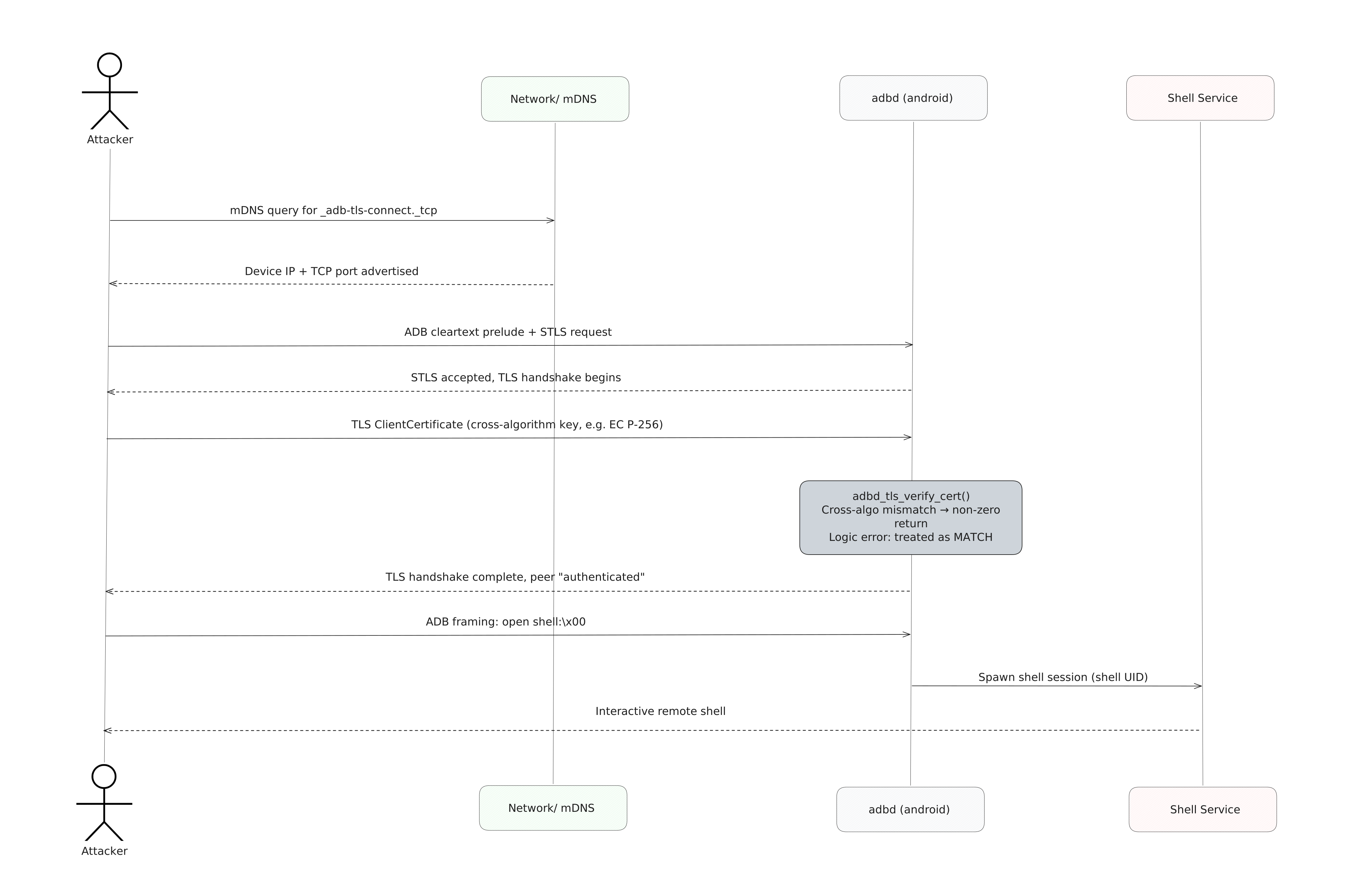
Fig 2: Attack Sequence
Why This Is Especially Dangerous
CVSS 8.8 captures the technical scope, but the real risk is the context in which shell access lands.
- Zero interaction. The device owner does nothing, no malicious link, no app install, no confirmation dialog. The attack is entirely silent.
- Persistent access. An attacker with ADB shell can install packages, read logs and notifications, modify shell-accessible settings, extract account tokens, and change device configuration, all without ever touching the screen.
- Mainline delivery cuts OEM delay. While that same Mainline delivery accelerates patching, it means organisations cannot assume OEM update timelines; devices may be fixed at different times depending on whether the user has allowed Play system updates.
- Developer device risk is highest. Any device where wireless debugging has ever been enabled and paired, developer phones, test fleet devices, CI/CD-attached handsets, Android-based kiosks or POS terminals, is in scope the moment it is on a network the attacker can reach.
- Spyware tradecraft overlap. Research has documented real-world Android spyware (Morpheus, per Osservatorio Nessuno’s April 2026 report) using Accessibility workflows to programmatically enable Developer options and wireless debugging. While Morpheus did not exploit this specific bug, the device state that CVE-2026-0073 requires has been actively produced by malware, meaning the exploitation surface is not purely theoretical for high-value targets.
- SELinux constrains but does not eliminate impact. The
shellSELinux context is not root, but it is a powerful staging point for data access, account abuse, app installation, and follow-on privilege escalation chains.
Affected Versions
| Branch | Vulnerable Versions | Fix Available |
|---|---|---|
| Android 14 | All builds prior to 2026-05-01 patch level | 2026-05-01 patch level |
| Android 15 | All builds prior to 2026-05-01 patch level | 2026-05-01 patch level |
| Android 16 | All builds prior to 2026-05-01 patch level | 2026-05-01 patch level |
| Android 16-qpr2 | All builds prior to 2026-05-01 patch level | 2026-05-01 patch level |
| Android 13 and earlier | Not affected (not listed in advisory) | N/A |
The fix is delivered via both OTA system updates and Google Play system updates (Project Mainline, adbd subcomponent). Devices on Android 10 or later may receive the fix through the Play system update path independent of carrier/OEM OTAs.
Mitigations
1. Apply the May 2026 security patch immediately. Navigate to Settings → Security & privacy → System & updates and verify your device is running security patch level 2026-05-01 or later. Apply any pending updates and reboot.
2. Check for Google Play system updates. For devices on Android 10+, navigate to Settings → Security & privacy → System & updates → Google Play system update and install any pending update. This path delivers the adbd fix independently of the OEM OTA.
3. Disable wireless debugging when not in active use. This is the most effective network-level mitigation. Navigate to Settings → Developer options → Wireless debugging and toggle it off. If you are not actively using wireless ADB, there is no reason to leave it exposed.
4. Disable Developer options entirely on non-development devices. For production devices, fleet devices, kiosks, and POS terminals that do not require ADB access, disable Developer options via Settings → Developer options → (toggle off). This prevents adbd from exposing any TCP endpoint.
5. Restrict network exposure. If wireless debugging must remain enabled, ensure the device is on a trusted, isolated network segment. Avoid shared or public Wi-Fi when wireless debugging is active. Network-level ACLs preventing ADB port access from untrusted hosts provide defence-in-depth.
6. Audit your device fleet. For enterprise or managed device environments, use MDM policies to audit and disable Developer options and wireless debugging across all enrolled devices.
Indicators of Compromise
No specific IoCs (file hashes, known attacker IPs, or network signatures) have been publicly attributed to exploitation of CVE-2026-0073 as of May 9, 2026. Monitor the Android Security Bulletin and your threat intel feeds for updates.
If you suspect a device may have been compromised via this vector, look for the following behavioural indicators:
On the device:
- Unexpected packages installed that were not installed via the Play Store or MDM
- Developer options enabled on a device where it should not be
- Wireless debugging enabled without a known administrative action
adb_keysfile at/data/misc/adb/adb_keyscontaining unrecognised host keys- Unusual battery drain or background network activity consistent with an active ADB session
In traffic logs:
- Unexpected outbound or inbound TCP connections on high-numbered ports from an Android device
- mDNS traffic advertising
_adb-tls-connect._tcpor_adb-tls-pairing._tcpfrom devices that should not have wireless debugging enabled - ADB protocol traffic (cleartext ADB prelude followed by a TLS upgrade) on non-standard ports
Configuration integrity:
- Changes to system settings (permissions, installed packages, accessibility services) not correlated with user or MDM activity
- New accessibility services or device admin packages not previously present